Showing posts with label naidoc. Show all posts

Monday, July 08, 2019

second iteration of a NAIDOC week poster using Turtle Art

Here is the poster again, or rather part of it:


This time I want to add the pale dots in the background. But how do I do that without them intruding into the centre? It's a matter of sequence. First do the dark blue background. Then do the pale dots all over. Finally, redo a dark blue, filled circle in the centre to overlay the pale dots there.

Here's the procedure for doing the background and pale dots all over:
Dark blue color = 70
Pale dots color = 40

Screen dimension are from  -340 x to +340, from -265 y to +265. I used random to position 100 dots anywhere within those parameters.

pendown (pd) then forward 0 makes the dots

Here's the procedure for filling in the centre with dark blue again over the top of the dots there:

Put the turtle in the centre, set the color and shade, put the pen down (pd) and rotate around 360 degrees drawing the dark blue lines. The pensize was set to 6 earlier.
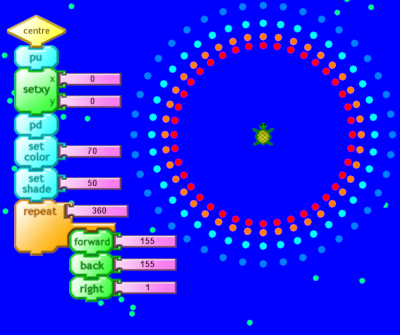


Here's the final effect, also showing the tops of the procedures which draw the whole thing:

first iteration of a NAIDOC week poster using Turtle Art

POSTER IMAGE
This is a first iteration. Yes, it could be improved. I'm only showing part of the poster and only attempting to make a part of it digitally using Turtle Art:

Turtle Art image:

BREAKING IT DOWN
To draw a single dot:
The turtle begins in the centre
penup
forward 100
pendown
set color 0 (0 = red)
set pensize 8 (determined by testing different numbers)
forward 0 (this is how to draw a dot)
penup
back 100 (return the turtle to the centre)

To draw a circle of dots:
repeat 360 [single dot then right 1]
But then the dots are too close together, so increase right 1 to right 2 or 4 or 9 (factors of 36)
repeat 40 [single dot right 9]
9*40 = 360 (the turtle makes one complete trip around the circle)

The next diagram just shows the code to do the background and a circle of red dots:

Next step
To draw a slightly bigger circle of orange dots
Duplicate the red circle code
Increase forward 100 to forward 110 and increase back 100 to back 110
Change set color 0 (red) to set color 10 (orange)
The next diagram shows the code for doing the orange circle:

Next: complete the cyan and blue dot circles
Duplicate the code again
Just increase the circle size and change the colours (cyan = 50, light blue = 60)
See the picture at the start