Showing posts with label indigenous. Show all posts

Thursday, October 06, 2022

Kartiya are like Toyotas

If you are wondering why the Australian aboriginal situation never seems to improve then read Kim Mahood's amazingly brilliant and satirical essay from 2012, Kartiya are like Toyotas

kartiya: (western Katherine Region) white person
Extract (one of the serious bits, there are other wickedly funny bits):
The contradiction at the heart of the story is that for the quality of desert Aboriginal lives to improve in the terms demanded by humanitarian standards – in health, education, housing and the like – the people themselves must become more like us, and to become more like us requires them to relinquish the identity from which their resilience and sense of self is drawn. Without their Aboriginal identity they are reduced to society's dross: the poorest, the least employable, the shortest lived, the least literate, the substance abusers and losers and wife bashers. And one of the most powerful ways in which they keep hold of that identity is by defining it against white people.

Among the older people, holding onto traditional culture is the force in which they believe, but the young are like the young in every culture. They don't listen to us, the old people complain, while the young people move in flocks, plugged into iPods and clutching mobile phones, trying whatever drug is available, dreaming of becoming rock stars and film stars and sports stars, using sex as an antidote to boredom. The cultural structures are still there, in skin names, family relationships, identification with country. But they are loosening all the time, as the fine tough threads of high knowledge are wearing out, leaving behind a shadow knowledge that carries the fear of punishment without the protocols and understanding with which to manage it.

Sunday, September 22, 2019

indigi digi 2020

- Brief outline of a Digital Technology course with indigenous themes

Indigenous themes
indigenous art, languages, stories, kinship systems, astronomy, fire and water

Software and a few Exemplars
Initially Scratch leading into Culturally Situated Design Tools, SNAP and App Inventor (others as appropriate). These are relatively easy to learn block coding languages.

Scratch is a popular block code language which enables the user to manipulate rich media (sounds, music, animation) with simple combinations of commands. Indigenous icons can readily be imported into Scratch and stories built around them.

The metaphor that has developed around Scratch has been low floor (easy to get started), wide walls (diversity in projects) and open windows (collaboration). This metaphor translates readily to indigenous cultural themes of grounded, experiential learning, the diversity of the Land and using your own language for communication and collaboration.

SNAP is a more powerful version of Scratch, better suited to Culturally Situated Design Tools in the longer term

Culturally Situated Design Tools is an approach pioneered by Ron Eglash et al and adapted for aboriginal central desert art motifs (dotted circles with textured backgrounds) by Bill Kerr. The picture below shows one variation of a myriad of possibilities (developed with Scratch):

With App Inventor students can develop phone apps for android phones. For example, I have developed an Arrernte Language app to help those learning the language to pronounce the words. With this app someone learning the language can sit with a fluent speaker and if they mispronounce the words the fluent speaker can record a better version.

Other resources Computers, micro:bit, indigenous icons, QR codes, Android phones, indigenous dictionaries. This is a low cost list which can be further developed depending on interest and needs.

ACARA The focus is on coding, algorithms, decomposition, design (the core issues of ACARA’s Design Technology Curriculum)

Cross curricula themes will include art, indigenous language, science and maths depending on the time available.

Educational Philosophy: Meaningful collaboration
  • Coding to make something that is meaningful to the user
  • Students join an online coding collaborative community. Encourage remixing of projects, learning and building on the work of others
  • The learning process becomes imagine, realise, critique, reflect and iterate
WHO? Variations of this course can be developed for the indigenous cohort from Years 3-12, depending on what the school sees as most valuable / useful.

Time: Time intensive will work better, ie. 4 periods a week is better than 2 periods a week

Rationale: For various reasons most indigenous students have missed out on a Computer Science pathway up until now.

Issues relevant to schools and other educational institutions:
  • Many schools are not compliant with the ACARA Digital Technologies Curriculum
  • The computing revolution, Schumpeter's creative destruction, is ongoing and continues to transform society. The nature of this transformation needs to be elaborated but clearly there is a need for many schools to improve their computer science or computational thinking delivery.
  • Driving down the high tech highway looking in the rear view mirror is a real problem. Many schools use computers in useful but mundane ways (think Power Point, roll marking and report writing) rather than creative ways
  • Teachers who understand educational computing deeply can and do use computers in creative ways that engage nearly all students. In the hands of such teachers computers can be used to integrate and transform the curriculum
  • Think STEAM (Science, Technology, Engineering, Art and Maths) rather than STEM. Think STEAM for the 99%, computing education needs to include all social groups
REFERENCE
Proposal for an Australian Indigenous Version of Culturally Situated Design Tools

Arrernte Language App

ACARA Digital Technologies

Index of recent articles about computers and education by Bill Kerr

Friday, July 12, 2019

skills and dispositions utilised in simulating a NAIDOC poster using Turtle Art

After attending a NAIDOC event at Araleun Arts Centre I changed the poster I was simulating since I thought I could (eventually) transform all the features to one computer screen. I haven't achieved that yet.

In this blog I want to list the skills and dispositions which I have needed to call upon to do the simulation. This is necessary to do a mapping onto existing curriculum guidelines which in turn is necessary to "sell" the approach to schools that are meant to be guided or bound by particular curriculum guidelines.

I haven't done a rigorous mapping yet. That would require more work since the approach I am advocating here integrates indigenous culture with art with computing (Design Technology) and maths.

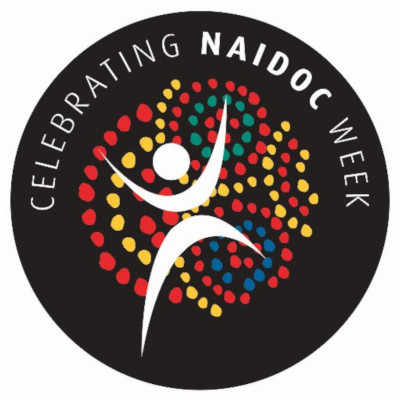
Here is the NAIDOC poster, Celebrating NAIDOC Week:

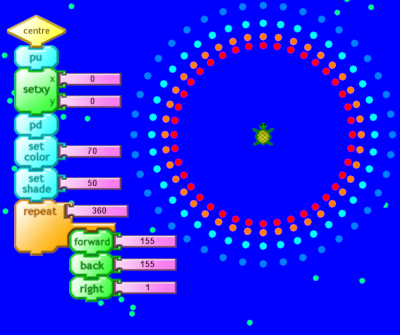
Here is a snapshot of where I have got up to so far with Turtle Art:

I'm not attempting to explain here step by step how I did it. This blog is a listing of the skills and dispositions I think I utilised as I made the simulation. It's only a draft. To do this properly would require a team of people with expert knowledge in those four domains: Indigenous culture, Art, Design Technology and Maths

CULTURAL KNOWLEDGE
Circles and dots are part of aboriginal art. This is fairly obvious as is my ignorance of the significance of this for the culture. Ignorance which I need to rectify.

DESIGN and ART KNOWLEDGE
Define the problem: what is my goal here? A digital simulation which employs turtle geometry
Planning a solution or multiple solutions
Breaking the pattern into a series of circles or arcs of circles
Notice the variation in dot size, shape and spacing as well as colour (now implemented)
Draw some scaffolding lines to help organise positions (centre dot, outer circle)

MATHS KNOWLEDGE OF CIRCLES
360 degrees in a circle
an arc is part of a circle
angle estimation of arcs b/w 0 and 360
Factors of 36 (18*2, 9*4, 12*3) needed for writing procedures in Turtle Art,
eg. repeat 9[fd bk stuff, then right turn 40] will do one turtle trip around the circle, since 9*40=360

OTHER MATHS
Multiplication (9 times tables, 90 times tables)
Subtraction, eg. if the start of the arc is at -20 and the end of the arc is at -190 then how many degrees is the arc? Answer 170
Division (see below)

TURTLE ART PROGRAM FEATURES
pen down for when you want to draw
pen up for when you want to reposition the turtle
sequencing, do the background before the circles
How to draw a circle with the turtle returning to the centre (iteration or repeating)
How to draw a dot and vary it’s size, colour and shade
How to make the dots slightly lumpy (requires some randomisation and a variable to store the heading)
Cartesian co-ordinates xcor, ycor
Print feature to obtain xcor, ycor and heading when required
Positioning the turtle, eg. at the next circle centre
Heading of turtle (required for initial arc positioning)
Screen size x +- 340, y +- 265
Color codes ROYGBIV 0-100
Shade codes darkest 0, lightest 100
Naming procedures, using helpful or meaningful names systematically

COMBINING KNOWLEDGE
Division estimation to determine dot spacing in an arc

eg 1. 6 dots in an arc of 90 degrees
Angle to turn = 90/6 = 15
Procedure: repeat 6 [ forward backward stuff then right 15]

eg 2) 8 dots in an arc of 170 degrees
Angle to turn = 170/8 = 21
Procedure: repeat 8 [ forward backward stuff then right 21]

Guess and test (tweaking): estimate, try it out, modify, test again (iterate, iterate, iterate)
Recording tweaks for efficient comparison, eg. to work out x and y coordinates for circle centre
Solution evaluation eg. the dots lack variation, how can I vary them more? (now implemented, they are slightly lumpy)

DISPOSITIONS
Try / fail / try again
Persistence, Flexibility, Tolerance of error / debugging

REFERENCE:
Turtle Art program

Turtle, Art, Turtle Art by Paula Bonta, Artemis Papert and Brian Silverman (2010)

Turtle Art Software by Gary Stager
This article contains a link to Gary's Turtle Art cards which I found extremely useful.

Monday, July 08, 2019

second iteration of a NAIDOC week poster using Turtle Art

Here is the poster again, or rather part of it:


This time I want to add the pale dots in the background. But how do I do that without them intruding into the centre? It's a matter of sequence. First do the dark blue background. Then do the pale dots all over. Finally, redo a dark blue, filled circle in the centre to overlay the pale dots there.

Here's the procedure for doing the background and pale dots all over:
Dark blue color = 70
Pale dots color = 40

Screen dimension are from  -340 x to +340, from -265 y to +265. I used random to position 100 dots anywhere within those parameters.

pendown (pd) then forward 0 makes the dots

Here's the procedure for filling in the centre with dark blue again over the top of the dots there:

Put the turtle in the centre, set the color and shade, put the pen down (pd) and rotate around 360 degrees drawing the dark blue lines. The pensize was set to 6 earlier.


Here's the final effect, also showing the tops of the procedures which draw the whole thing:

first iteration of a NAIDOC week poster using Turtle Art

POSTER IMAGE
This is a first iteration. Yes, it could be improved. I'm only showing part of the poster and only attempting to make a part of it digitally using Turtle Art:

Turtle Art image:

BREAKING IT DOWN
To draw a single dot:
The turtle begins in the centre
penup
forward 100
pendown
set color 0 (0 = red)
set pensize 8 (determined by testing different numbers)
forward 0 (this is how to draw a dot)
penup
back 100 (return the turtle to the centre)

To draw a circle of dots:
repeat 360 [single dot then right 1]
But then the dots are too close together, so increase right 1 to right 2 or 4 or 9 (factors of 36)
repeat 40 [single dot right 9]
9*40 = 360 (the turtle makes one complete trip around the circle)

The next diagram just shows the code to do the background and a circle of red dots:

Next step
To draw a slightly bigger circle of orange dots
Duplicate the red circle code
Increase forward 100 to forward 110 and increase back 100 to back 110
Change set color 0 (red) to set color 10 (orange)
The next diagram shows the code for doing the orange circle:

Next: complete the cyan and blue dot circles
Duplicate the code again
Just increase the circle size and change the colours (cyan = 50, light blue = 60)
See the picture at the start

Sunday, April 08, 2018

digital immersion mongrel Vygotsky

DIGITAL IMMERSION MONGREL VYGOTSKY
- a contextual pathway to enable modern indigenous technology

The origin of this was an exploration of an effective way (pragmatically) to bring digital technology to indigenous people. This turned into a hands on exploration of disparate fields which for convenience can be organised under three sub-headings which can in turn be melded together:

Epistemology: One interpretation of Vygotsky argues that all knowledge is socially constructed and that ethnomethodology, paying detailed attention in the now, is the best or only way of detecting and evaluating what is going on (Wolff-Michael Roth). This world view is critical of other learning theories be they behaviourist, cognitivist or constructivist.

Culture: Martin Nakata’s (cultural interface) and Kwame Appiah’s (cosmopolitan) approach is that indigenous (and other) culture is mongrel (no longer traditional), consisting of disparate, complex threads created by the intermingling of the traditional with the colonial. It follows from this that effective communication between different cultures must be contextual based by paying detailed attention to the now.

Technology: Taking a broad view there are many human technologies originating from the hand and the word. Digital technology (moving bits) is now replacing print as the dominant social medium. The only effective way to master digital technology is through full immersion in the medium. Some groups working with the Disadvantaged in the Third World have understood this, eg. Learning Equality, and use affordable hardware (Raspberry Pi and low-cost Android tablets), software (FOSS) and infrastructure (sneakernet where internet connectivity is limited).

Combining these approached leads to “Digital Immersion Mongrel Vygotsky”. The goal is to combine these three approaches to find the contextual sweet spot in the middle of the teething rings.

Reference:
Appiah, Kwame Anthony. Cosmopolitanism: Ethics in a World of Strangers (2007)
Learning Equality
Nakata, Martin. Disciplining the Savages, Savaging the Disciplines (2007)
Roth, Wolff-Michael. The Mathematics of Mathematics: Thinking with the Late, Spinozist Vygotsky (2017)