I conclude here that this is a better and less expensive pathway for
soft technological artistry than LEGO Mindstorms
This is my first Hummingbird Bit project. It was a fun project. The Hummingbird Bit has an outstanding design.

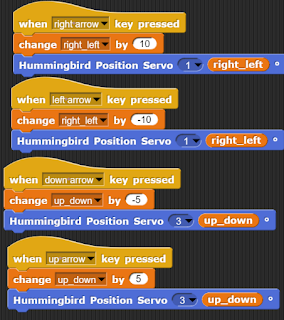
I had to explore the input and output features of the Hummingbird Bit. The important ones for this project were the position and rotation servo outputs.

Then I had to buy the materials and build the bee. Finally, I had to code the bee to point and waggle.

I've also done an evaluation of how it maps onto the ACARA Digital Technology curriculum and how that process could be made more interesting.
BUILDING THE BEE
The
lesson plan provided by BirdBrain suggests that the teacher builds a sample bee beforehand and shows it at the right strategic moment to help the students get on with it. The main challenge in the lesson in the BirdBrain design (where less help is provided) comes in the coding section.
 Issues
: Hummingbird projects employ craft materials and so end up more diverse and less "blocky" than your typical LEGO projects. Lets call that
soft technological artistry, aka STEAM rather than STEM.
CODING THE BEE
If you look at the Attenborough
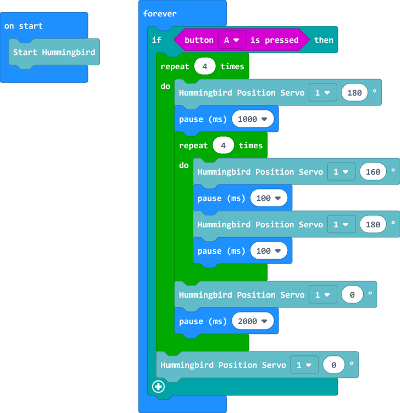
video you see the bee attracts an audience, points, waggles, walks around clockwise, waggles again, then walks around anti-clockwise waggles again etc.
So, initially I opted for the rotation servo because it can move through the full 360 degrees whereas the position servo can only move through 180 degrees.
This, however, was not the best move because of some quirks in transferring code (which makes logical sense or at least I think so) into the physical world. There is a problem here I haven't solved yet but won't go into details because it would take up too much space. Is there a Help Group for such problems, I'll look later.
So, in the end I opted for the position servo despite it's limited functionality in only being able to rotate 180 degrees. The bee turns out to be a smarter coder than me!
 ACARA CARDBOARD
Can't help it. From the year 7-8 Design Tech curriculum here are some of the objectives which are covered or could be covered depending partly on how this project is organised in the classroom:
- Define and decompose real-world problems taking into account functional requirements and economic, environmental, social, technical and usability constraints (ACTDIP027)
- Design the user experience of a digital system, generating, evaluating and communicating alternative designs (ACTDIP028)
- Design algorithms represented diagrammatically and in English, and trace algorithms to predict output for a given input and to identify errors (ACTDIP029)
- Implement and modify programs with user interfaces involving branching, iteration and functions in a general-purpose programming language (ACTDIP030)
- Evaluate how student solutions and existing information systems meet needs, are innovative, and take account of future risks and sustainability (ACTDIP031)
- Plan and manage projects that create and communicate ideas and information collaboratively online, taking safety and social contexts into account (ACTDIP032)
I think an interesting way to manage ACARA guidelines would be through Talent Identification as outlined by Jennifer Cross in
her PhD. I need to do some more work on that, too. In the process of completing this project I had to exercise
- Improvisation skills in building the bee (the foam shapes I bought weren't all the right size so I returned to Mad Harry's to buy a pom pom for the bee's head)
- Planning skills both with regard to buying materials and algorithmic planning for the code
- Decomposition aka breaking the code into smaller bits, ie. doing the rotation through 180 degrees and the waggle sequence separately and then putting them back together
- Pattern recognition, there is iteration (repeats) in the code for both the bee waggling and the bee rotating
- Constraints with regard to choosing either the rotation or position servo and problems I had with the rotation servo
- Persistence, in particular, in attempting to resolve problems with the rotation servo
In conclusion, I think a strong case can be argued for the Hummingbird Bit as a better pathway for
soft technological artistry as well as less expensive when compared with LEGO Mindstorms.
REFERENCE
Introductory video showing the capabilities of the Hummingbird Bit
Program, Build, Teach and Resources for Hummingbird Bit and MakeCode
Bee Waggle video and link to lesson plans